
Showing posts with label Blog 部落格架設. Show all posts

Friday, March 23, 2012

讓Blogger中張貼的Flickr照片不要連回Flickr,並用Blogger的燈箱顯示

Share this :
許多寫部落格的朋友喜歡在部落格中張貼Flickr相簿內的照片。我也不例外,但覺得美中不足的是,張貼過來的照片,總是會連回Flickr相簿。如何讓他不要連回Flickr,而且當讀者點擊照片後,直接使用Blogger內建的燈箱顯示該照片。其實這都是可以辦到的,在此分享我最近研究的結果。

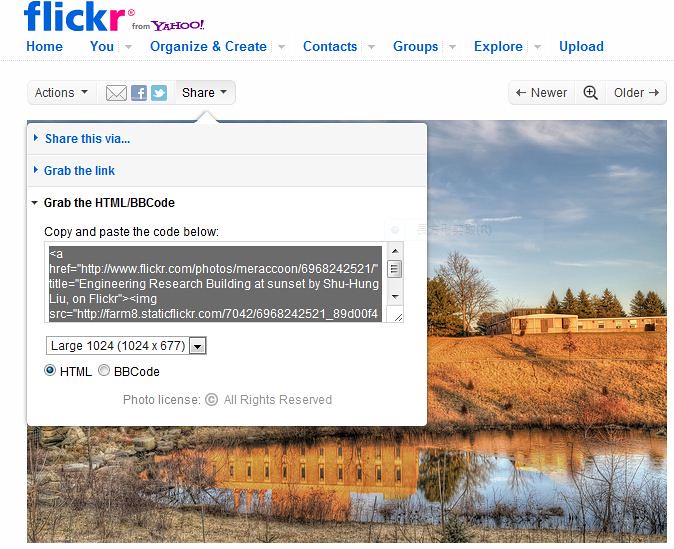
首先在Flickr照片的分享介面中選擇HTML程式碼(如下圖)
flickr_share

以我這張照片為例,HTML程式碼如下:
<a href="http://www.flickr.com/photos/meraccoon/6968242521/" title="Engineering Research Building at sunset by Shu-Hung Liu, on Flickr"><img src="http://farm8.staticflickr.com/7042/6968242521_89d00f48db_b.jpg" width="1024" height="677" alt="Engineering Research Building at sunset"></a>

先解釋比較簡單的程式碼第二段部分:即
<img src="http://farm8.staticflickr.com/7042/6968242521_89d00f48db_b.jpg" width="1024" height="677" alt="Engineering Research Building at sunset">
  • src=  後面的網址為此照片在Flickr伺服器上的位址,這個網址基本是不用改,但是我喜歡把 staticflickr 改成 static.flickr(中間多了一點),原因之後會做說明。
  • width= 後面的數字可以用來設定這張照片要顯示的寬度。
  • height= 後面的數字可以用來設定這張照片要顯示的高度。我習慣的做法是直接改寬度,然後把高度的程式碼砍掉,Flickr會自動把照片按照原本的長寬比套用你所設定的寬度來調整照片的大小。
  • alt= 後面所接的文字為萬一照片無法顯示時所顯示的替代文字。
接下來姐是重點部分,程式碼的第一段:即
<a href="http://www.flickr.com/photos/meraccoon/6968242521/" title="Engineering Research Building at sunset by Shu-Hung Liu, on Flickr">
  • title= 後面所接的文字為滑鼠移動到照片上後,所顯示的說明文字。可依照個人需求自行更改。 
  • href= 後面的網址即為點擊照片後會前往的網址,要讓照片不要連回Flickr,就是要改這個地方。那該怎麼改呢?最簡單的改法,如果不要照片點擊後有任何的效果,可以直接將 href="......" 這部分的程式碼移除,請看以下範例:
下圖HTML碼為:
<a  title="滑鼠移動到照片上後,所顯示的說明文字"><img src="http://farm8.staticflickr.com/7042/6968242521_89d00f48db_b.jpg" width="400" alt="Engineering Research Building at sunset"></a>
Engineering Research Building at sunset
各位可以看到,在我移除掉 href="......" 這部分的程式碼後,這張照片已經不能點擊了。將游標移動到照片上後,會顯示title= 後面的說明文字(經實際測試,使用Chrome瀏覽器會顯示title= 後面的說明文字;使用IE會顯示alt=後面的替代文字)。我還將照片寬度改為400,並將高度的設定移除,讓照片維持原有的長寬比。

接下來說明要如何在點擊照片後用Blogger內建的燈箱來顯示此照片,首先在Blogger的 設定-->文章和留言-->在燈箱中展示圖片 設定為"是",接下來請看以下範例:

下圖HTML碼為:
<a href="http://farm8.static.flickr.com/7042/6968242521_89d00f48db_b.jpg" title="Engineering Research Building at sunset by Shu-Hung Liu"><img src="http://farm8.static.flickr.com/7042/6968242521_89d00f48db_b.jpg" width="400" alt="Engineering Research Building at sunset"></a>
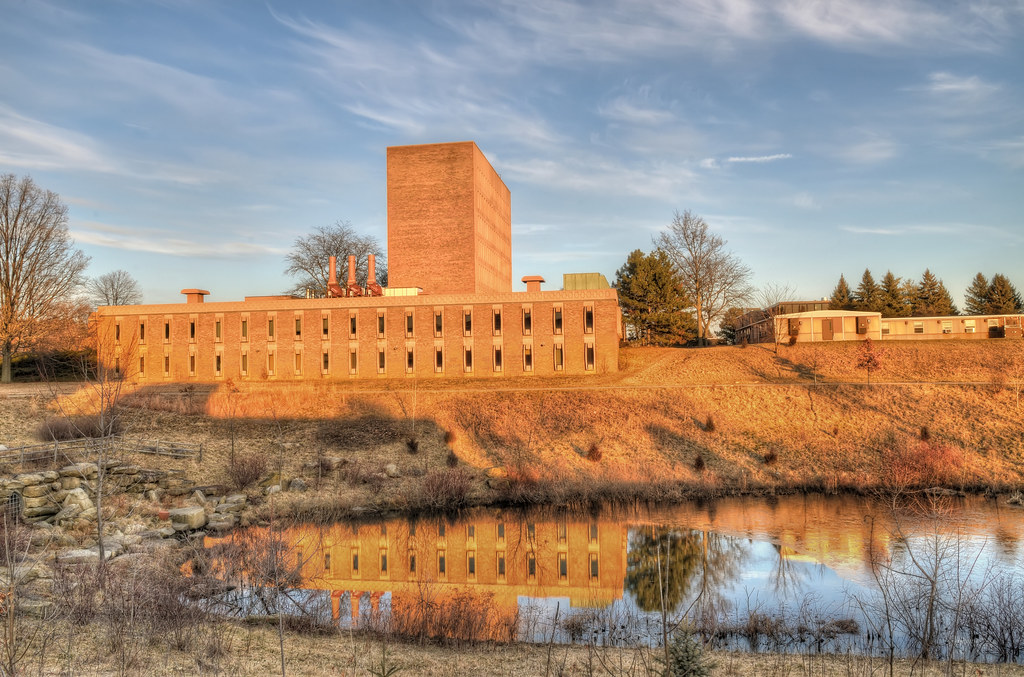
Engineering Research Building at sunset
首先我把src=後面的網址staticflickr 改成 static.flickr(中間多了一點),然後將修改後的網址複製後貼到 href= 之後。大家可以點擊照片,看看燈箱的效果。
若是不把staticflickr 改成 static.flickr,結果又會如何,請看以下範例:

下圖HTML碼為:
<a href="http://farm8.staticflickr.com/7042/6968242521_89d00f48db_b.jpg" title="Engineering Research Building at sunset by Shu-Hung Liu"><img src="http://farm8.static.flickr.com/7042/6968242521_89d00f48db_b.jpg" width="400" alt="Engineering Research Building at sunset"></a>
Engineering Research Building at sunset
程式碼基本上與上一張圖相同,唯一不同處是在href= 後面把 static.flickr 改回staticflickr。大家可以點擊看看,燈箱的效果消失了。

staticflickr 改成 static.flickr的方法是我自己亂試試出來的,我也不清楚為何要這樣改。希望這篇文章對大家有幫助。

Friday, March 09, 2012

New slideshow for Daily Photo

Share this :
I've built a new page for my Daily Photo slideshow exhibition. Please click the "Daily Photo" icon on the navigation bar above or click here to see the new page.

Tuesday, January 10, 2012

Add "Related Posts" into this blog (新增"相關文章"功能至本網誌)

Share this :
I added a "Related Posts" feature on this blog. It's pretty cool and easy to install. If you are using Blogger, just link to LinkWithin and follow the instructions. If you don't want the "Related Posts" to appear on your homepage, you can refer to here. The modified result is the same as what is shown on my blog: when you click  into one of the posts, the "Related Posts" will show at the bottom of the post.

According to the FAQ of the LinkWithin, the related posts are chosen based on several factors, including title, tags, and content. I've tested some posts in my blog. Some works well and some not so well. For example, for the post Midway Geyser Basin in Yellowstone National Park, it does works well; all the related posts are from Yellowstone.

Friday, November 25, 2011

Add FACEBOOK buttons and comments into Blog

Share this :
I've added the FACEBOOK "like" and "share" buttons into my Blog temple. I've tested this two buttons. It worked well. Reference URL: http://blog.xmlgadgets.com/blogger/facebook-like-button-for-blogger/

My wife told me that the original comment box in my Blog is inconvenient to use. (You have to login to Blogger or Enter your name.) Accordingly,I added the FACEBOOK comment box into my Blog temple. The process was complicated. I were still testing the program. If you are also interested in this program, here are the reference URLs: Link1, Link2.

Monday, January 10, 2011

好久沒有寫blog了

Share this :
好久沒有寫blog了
自從感覺博士班好像畢不了業之後
我破釜沈舟的不再上ptt、不再寫blog、不再拍實驗以外的照片、不再上msn
如今我已取得博士學位、訂了婚、準備前往美國
在現實生活的壓力再度壓垮我之前
我恢復了拍照和blogging
為了轉換心情我換了新的blogger範本
新的blogger編輯器蠻好用的
可以很簡單的插入『繼續閱讀...』
不用像以前還要寫HTML code
沒想到套用了新的範本後
以前的文章用寫HTML code加入的『繼續閱讀...』卻不見了
真是糟糕

Thursday, August 10, 2006

隱藏NavBar

Share this :
怎麼要讓Blogger(舊版)中最上方的NavBar消失呢??
只要在範本中加入下面幾行即可

#b-navbar {
height:0px;
visibility:hidden;
display:none
}

我現在還蠻喜歡NavBar的
所以沒有讓他消失

IE真是太爛了!!

Share this :
最近用Blogger做了一個新的網站
因為我一直都是用FireFox瀏覽器來測試我的網頁
都沒有什麼問題

直到今天我把網頁給我妹看的時候
他用IE開起來卻是一片空白
真是太令人震驚了

我測試在Blogger建立新的Blog
結果用IE開啟也是一片空白

太奇怪了
用google搜尋果然很多人有這個問題
原來是網頁編碼的問題
我使用了香港仔公國提供的解決方法

解決方法:

在Template內的html作出一個小修改:

一)在頭幾行中找出<title><$BlogPageTitle$></title>這一句

二)把這句剪下,並貼在<head>和</head>之間內文字的最後一句,即</head>的前一行:

<head>
<$BlogMetaData$>
<style type=”text/css”>
….
….
….
….
<title><$BlogPageTitle$></title>
</head>

三)最後將修改儲存